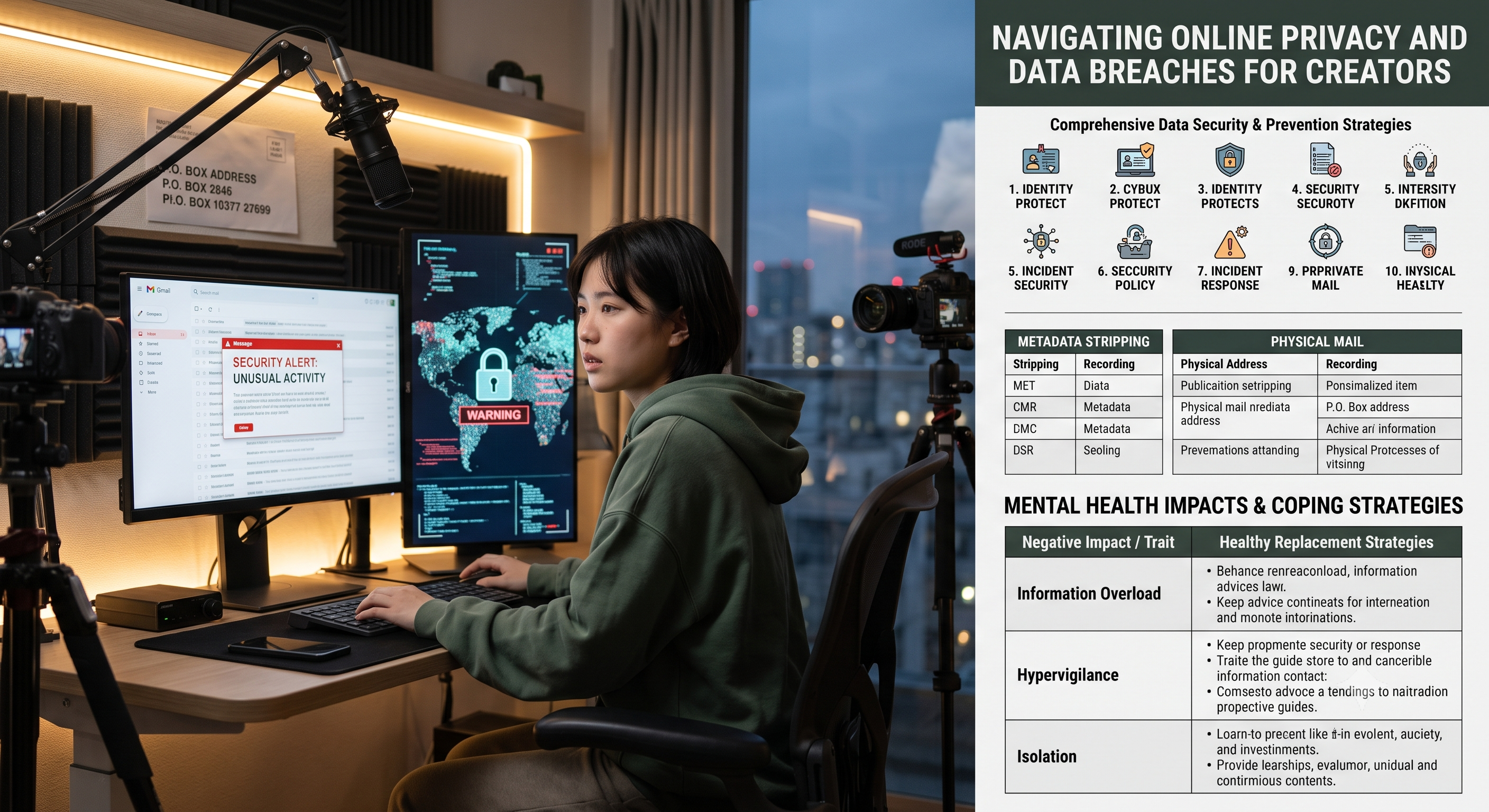
The leakage of personal information online poses a direct threat to the careers and personal lives of content creators. When private information such as addresses, phone numbers, or financial data is leaked, account security is compromised and audience trust is undermined. In the reputation-driven digital economy, data breaches can lead to lost sponsorships and identity theft, putting entire digital brands at risk.
Proactive preparedness is crucial for protecting digital assets and mitigating the severe consequences of data breaches. Creators must invest resources in securing their primary communication channels, updating hardware access permissions, and implementing multi-factor authentication. By establishing immediate defenses and reducing digital vulnerabilities, professionals can protect their content channels and prevent unauthorized account misuse.
Long-term protection requires a strategic, continuous approach to managing digital footprints. Beyond basic password updates, creators must audit third-party application permissions, monitor public database registries, and maintain separate networks for personal and business tasks. Developing these daily management habits ensures career sustainability, allowing creators to focus on their own development without constant worry about accidental data breaches. **Comprehensive Data Security and Prevention Strategy** **1. Identity Protection and Prevention Strategy** **Account Security** **-
**
- **Enforce Time-Based One-Time Passwords (TOTPs) across all platforms using a dedicated authenticator application.** **
- **
- **Use an automatic password manager to generate and store random, unique 16-bit keys.** **
- **
- **Disable SMS-based recovery options to eliminate the risk of SIM card swapping attacks.**
2. Digital Footprint Management
| Action Projects | Implementation Methods | Expected Results |
| Data Proxy Removal | Submit an opt-out request to the public search database. | Reduce the public availability of home addresses and phone numbers. |
| Metadata Stripping | Clear EXIF data before uploading images and videos. | Prevent tracking of exact filming locations. |
| Old Account Review | Deactivate infrequently used forums, old portfolios, and old social media accounts. | Minimize the historical attack surface available to malicious actors. |
3. Network and Hardware Security
-
Route all public Wi-Fi traffic to a trusted encrypted Virtual Private Network (VPN).
-
Isolate smart home devices and personal mobile hardware to a separate guest Wi-Fi network.
-
Keep operating systems, firmware, and production software updated to patch zero-day vulnerabilities.
4. Communications and Consulting
| Asset Class | Security Configuration | Risk Mitigation |
| Public Email | Use a dedicated domain name for business inquiries and sponsorships only. | Protect the primary administrative login email from disclosure. |
| Phone Contact Information | Deploy VoIP services (such as Google Voice) for public-facing communications. | Prevent unauthorized SIM card access and location tracking via base stations. |
| Physically Secure Mail | Send all audience mail, gifts, and contracts to a secure post office box. | Hide your actual residential address from the public. |
5. Legal and Financial Protection
-
Establish a formal business entity (e.g., a limited liability company) to anonymously register domain names and business assets.
-
Freeze your personal credit records with major credit agencies to prevent unauthorized loan applications.
-
Set up real-time transaction alerts for all business cheque accounts and credit lines.
6. Platform Access and Third-Party Permissions
| System Components | Required Operations | Security Margin |
| API Integration | Revoke access to legacy editing tools, analytics applications, and plugins. | Eliminate backdoor entry points through compromised vendors. |
| Delegate Access Permissions | Use platform-native administrator roles instead of shared master passwords. | Limit administrative controls while allowing collaborative editing. |
| Recovery Code | Print and save. Lock the master backup password in a fireproof safe. | Account recovery is guaranteed if the master device is lost. |
7. Incident Response Plan
-
Maintain an offline paper list containing platform support links and emergency contact channels.
-
Pre-save communication templates to quickly notify sponsors and followers in the event of account misuse.
-
Back up original video footage, project files, and system configurations to a separate external drive daily.
8. Domain and Hosting Privacy
| Infrastructure | Privacy Metrics | Enforcement Policy |
| WHOIS Registry | Enable privacy registration to hide ownership details. | Hide registrar's name, email, and phone number so they don't appear in public WHOIS queries. |
| Website Hosting | Route website traffic via reverse proxies like Cloudflare. | Hide the true source IP address of your website or server. |
| Storage Architecture | Encrypt cloud backup storage buckets containing sensitive identity files. | Prevent unauthorized data reading even if the storage bucket is compromised. |
9. Social Engineering Defense
-
Conduct regular security awareness reviews to identify sophisticated phishing campaigns.
-
Be highly vigilant against unsolicited sponsorship offers containing executable attachments.
-
Establish a second verification channel before clicking on links sent by regular business contacts.
10. Collaboration and Team Agreements
| Vulnerability | Strategy Standards | Operational Objectives |
| Shared Assets | Use a cryptographic credential store for team-wide asset sharing. | Prevent the disclosure of original passwords in text messages or group chats. |
| Confidentiality Agreement | Include strict confidentiality clauses in contractor agreements. | Prevent the internal disclosure of unreleased media or sensitive policies. |
| Resignation | Immediately revoke the contractor's cloud and server access after their departure. | Remove any access permissions left by former employees. |
Psychological Impact and Coping Strategies
The sudden or prolonged disclosure of private information can lead to severe psychological distress, manifested as hypervigilance, loss of creativity, and extreme anxiety about public judgment.
Recognizing these emotional patterns and consciously replacing harmful habits with structured, protective daily routines is crucial for long-term career development and personal well-being. Healthy Alternatives for Protecting Mental Health-
Information Overload
-
Things to Avoid/Eliminate: Browsing public forums, comment sections, or search results to track discussions about leaks.
-
Healthy Alternative Strategies: Regularly update your security. Limit checks of data or mentions to a strict 15-minute timeframe, once a day. Use remaining screen-free time for offline activities, reading, or communicating with trusted peers.
-
-
Over-vigilance and constant alerts
-
Things to avoid/eliminate: Repeatedly checking account login logs, phone notifications, and security dashboards all night.
Healthy alternatives: Automated alerts and technological boundaries. Delegate monitoring to automated alert systems that only notify you in case of serious malfunctions. Lock all devices two hours before bedtime to establish a strict "digital sunset."
-
-
Isolation from the creative community
-
Things to Avoid/Eliminate: Completely cutting off contact with peers due to shame, fear, or worry about others' judgment.
-
Healthy Alternative Strategies: **Closed-off Support.** Stay away from public social media and instead communicate with a small group of knowledgeable, trustworthy creators in private offline spaces or secure group chats.
-
-
Feelings of Helplessness and Vulnerability
-
Things to Avoid/Eliminate: Passively indulging in the loss of privacy or focusing entirely on uncontrollable digital threats.
-
Healthy Alternative Strategies: **Proactive Privacy Protection.** Action. Transform your anxious energy into action. Use this time to systematically update security keys, organize files, or build an offline emergency preparedness toolkit. ...
-
